 Inter Mission
14 personlige Links
In this step-by-step tutorial video, learn how to highlight your mouse cursor to make it easier for your audience to follow your mouse movements and clicks. The two options that I feature in this video are entirely free. Highlighting your mouse pointer is especially valuable during presentations, demos, remote teaching, and screen recording. Follow along to find out how to make this work on Windows 7, 8, and 10. At the end, I also show you how to turn on mouse highlighting within OBS or Open Broadcaster Software.


In this step-by-step tutorial video, learn how to zoom in and then zoom out on a certain area in your screen recording. This is especially helpful for instructional or tutorial videos. I personally use this in my tutorial videos on YouTube.
NB ! En anden mulighed: ZoomIt
Installer denne app fra Windows Sysinternals - og du kan zoome mens du optager skærmen - eller præsenterer skærmen.
Learn how to edit videos using the Windows 10 video editor. The Windows video editor comes pre-installed and is free to use. In this step-by-step tutorial, I'll show you how to edit videos on Windows 10.
Multiview gives you a visual preview of eight screens, not just one which is extremely helpful. Just click view at the top left and multiview (windowed). This selection will show a popup box showing you the eight preview windows. Make sure to unclick "Studio Mode" before making your selections. You can resize the popup screen with little effort. When you click each window, you'll transition right to the live screen. This function is fantastic.
OpenShot is an award-winning free and open-source video editor for Linux, Mac, and Windows. Create videos with exciting video effects, titles, audio tracks, and animations.
Man kan i EasyWorship lave en automatisk skift af vers, hvis salmerne er indspillet.
Here's Advanced Settings for OBS.Ninja
OBS Ninja lets you bring remote video feeds into OBS via WebRTC - steveseguin
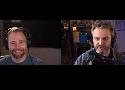
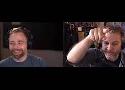
Chris and Steve explain how to use OBS Ninja to send and receive high-quality video at low latency in your web browser.
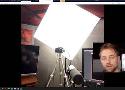
Til trods for at dette websted er skabt til OBS integration, kan det også benyttes alene.
Giver en simpel streaming mulighed til ethvert WebCam.
Eller til hurtig deling af skærm.
Det er ret sejt...
Ved workshoppen for Metodistkirkens præster blev ½ time brugt på en præsentation af nogle praktiske løsninger fra Sound Tek.
Der blev blandt andet præsenteret en 'Plug N Play' løsning til at streame de kirkelige handlinger via Hjemmeside, Facebook eller Youtube.
Personligt fandt jeg en sådan Plug N Play løsning for usmidig - og dyrt.
Men som Total Løsning er de interessante og kunne præsentere nogle fornuftige produkter.
Gennem undervisning og viden om kommunikation og sociale medier hjælper hellochurch kirker i hele landet med at blive mere synlige i deres opland.
hellochurch tilbyder workshops, rådgivning og inspiration om sociale medier, der er skræddersyet den enkelte kirke.
I forlængelse af Corona nedlukningen af kirkerne, blev online tilstedeværelse sat i fokus for kirken. Blandt Metodistkirkens præster indså man behovet for også at arbejde videre med analyse, strategi; men også få rådgivning. Derfor blev hellochurch bedt om at stå for en workshop til præsternes efterårsstævne.
Her kommer EasyWorship med en anmeldelse af Mevo Start kameraet. Det er nærmere en anbefaling end anmeldelse...
Bemærk at dette kamera kan operere trådløst. Kan integreres med EasyWorship eller OBS
Kameraet kan også benyttes som alm. WebCamera til f.eks. online møder.
Med sine €450 (3.350,- kr) på Europa Webshoppen og $400 (2.560,- kr) på USA Webshoppen ligger Mevo Start i prisklasse med de dyrere WebCameras - eller i prisklasse med et GoPro Hero.
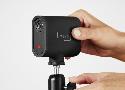
Mevo creates the world’s only live streaming cameras and dedicated iOS and Android Apps, enabling you to stream and record your live events in just a few taps. Our newest camera, the Mevo Start, empowers content creators to stream 1080p to multiple platforms like Youtube and Facebook Live.
Professional free teleprompter software available for online and offline use. Imaginary Teleprompter is easy to use, and runs on a wide variety of computers. We created it to promote the democratization of media by enabling more people to produce quality contents at low cost, and to promote the adoption of free software solutions by the the media industries.
Her er en instruktions video - på dansk!
Den fortæller om opsætning af OBS Studio til optagelse af skærm.
Videoen er produceret til Københavns Professionshøjskole hvor man benytter online video tjenesten DreamBroker.
Men med OBS Studio gemmes optagelsen på egen harddisk - og kan evt. redigeres inden offentliggørelse.
The Church Media Guys - reviews a cheap HDMI capture card
This video explains how to use three cameras in Camtasia. Scott explains how you can use OBS Studio Virtual Cam combined with Camtasia to edit videos. This Camtasia trick will allow you to product video faster because you will no longer have to upload and edit multiple video tracks. This tip will save you tons of time because you will have the power to switch cameras as you create you video tutorial.
if you're interested in making your iPhone or your Droid phone a wireless webcam, then you must install the NDI Phone App. Scott will help you connect this technology for both phone types. This video will explain how to use your phone as a webcam for both Droid and iPhone.h

Scott explains how to set up your phone and OBS Studio to use the NDI plugin. This tutorial will show you how to accomplish three primary tasks with your OBS installation.
-
The first part will show you how to find and install the OBS studio Newtek NDI plugin. All you have to do is go to the Blue OBS website and search for the NDI Plugin. Installation is very straight forward. From a PC user's perspective, always download the exe file. You will also be shown an installation warning you of overwriting files on OBS. Don't worry about the prompt and press forward. Nothing terrible will happen to your streaming software.
-
The second part of this NDI installation is downloading the phone app for both iPhone and Droid. The Newtek NDICam app is a straightforward installation, and it only costs $10. The software works perfectly. There are some warning flags with Droid, though. People say the software sucks, and so I suggest you install and work with the IP Webcam. The app is 100% free, and everyone in the comments loves the app. You can find the link here.
https://play.google.com/store/apps/de...
This link will take you to an OBS studio install video.
- The third and final part of this tutorial explains the settings for NDICam and OBS. Scott explains what the various parameters are on your iPhone and how to create a connection on OBS. For the most part, the setup is very easy.