 Inter Mission
14 personlige Links
Here's how to connect two computers using OBS Studio, so you can play your game on one, and stream it on another, saving you precious CPU/GPU power.
The OBS Studio NDI Plugin.


OBS Studio Output in a Zoom Meeting
This video explains how to send OBS into a Zoom call, using NDI Tools. Lots of people these days want to "stream" their OBS output into a web call, so I show you step by step how to do that using OBS Studio and Zoom. There are TWO WAYS to do this, and I will explain both.
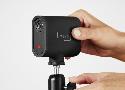
Mevo creates the world’s only live streaming cameras and dedicated iOS and Android Apps, enabling you to stream and record your live events in just a few taps. Our newest camera, the Mevo Start, empowers content creators to stream 1080p to multiple platforms like Youtube and Facebook Live.

if you're interested in making your iPhone or your Droid phone a wireless webcam, then you must install the NDI Phone App. Scott will help you connect this technology for both phone types. This video will explain how to use your phone as a webcam for both Droid and iPhone.h

Scott explains how to set up your phone and OBS Studio to use the NDI plugin. This tutorial will show you how to accomplish three primary tasks with your OBS installation.
-
The first part will show you how to find and install the OBS studio Newtek NDI plugin. All you have to do is go to the Blue OBS website and search for the NDI Plugin. Installation is very straight forward. From a PC user's perspective, always download the exe file. You will also be shown an installation warning you of overwriting files on OBS. Don't worry about the prompt and press forward. Nothing terrible will happen to your streaming software.
-
The second part of this NDI installation is downloading the phone app for both iPhone and Droid. The Newtek NDICam app is a straightforward installation, and it only costs $10. The software works perfectly. There are some warning flags with Droid, though. People say the software sucks, and so I suggest you install and work with the IP Webcam. The app is 100% free, and everyone in the comments loves the app. You can find the link here.
https://play.google.com/store/apps/de...
This link will take you to an OBS studio install video.
- The third and final part of this tutorial explains the settings for NDICam and OBS. Scott explains what the various parameters are on your iPhone and how to create a connection on OBS. For the most part, the setup is very easy.